Description
gaiaDB is the core data repository for the Gaia
toolchain, implemented as a PostgreSQL/PostGIS database (a Docker image
built on postgis/postgis). It holds the schema and the SQL
function library that ingest catalogued datasets, register them in a
common index, and join them to person locations to produce exposure rows
for the OMOP EXTERNAL_EXPOSURE table.
Architecture
backbone |
Metadata and index tables (data_source,
variable_source, geom_index,
attr_index), the two templates, and the ingestion and
catalog functions |
working |
location and location_history, the
per-dataset geom_<table_id> and
attr_<table_id> tables, and the
external_exposure output table |
vocabulary |
OMOP vocabulary tables |
public |
Raw source tables loaded by each dataset’s ETL scripts |
All data transformation, spatial operations and exposure calculations
are performed inside the database with SQL and PostGIS functions. See Design Principles for the schema in
detail.
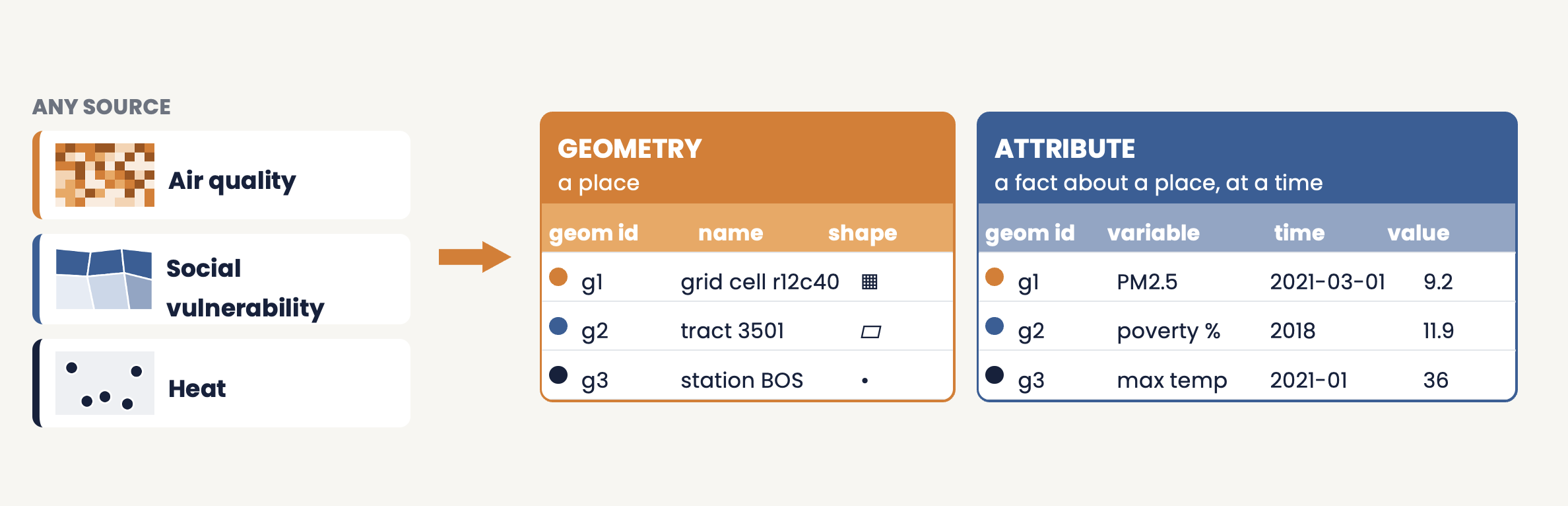
Geometries and attributes
Main functions
| Ingest a dataset |
backbone.ingest_datasource(table_id) (metadata load,
ETL scripts, geometry clean-up) |
| Build per-variable tables |
backbone.gdsc_load_all_variables(table_id, geom_label, ...) |
| Load locations |
working.load_location_csv,
working.load_location_history_csv (or gaiaCore’s
loadLocations() /
loadLocationsFromOmop()) |
| Check locations |
working.validate_location_data(),
working.location_statistics() |
| Join |
working.spatial_join_from_catalog(variable, table_id, ...),
working.spatial_join_all_from_catalog(table_id) |
| Inspect or reset |
working.exposure_statistics(),
working.clear_exposure_data(variable) |
The full function reference is in the repository README.
Access
gaiaDB is accessed through: - gaiaCore: R package
that connects directly and calls the database’s functions -
Direct database connections: standard PostgreSQL
clients - PostgREST API (optional): RESTful interface
to database functions and tables, deployed by gaiaDocker
gaiaDB is a standard PostgreSQL/PostGIS database, so it also runs on
any native Postgres server; Docker is a convenience, not a
requirement.
 OHDSI GIS
  OHDSI GIS
WG
OHDSI GIS
WG