Summarise temporal trends in OMOP tables
Source:vignettes/articles/summarise_trend.Rmd
summarise_trend.RmdIntroduction
In this vignette, we will explore the OmopSketch function
summariseTrend(), which summarises temporal trends from
OMOP CDM tables. This function allows you to visualise how key measures
(such as number of records, number of persons, person-days, age, or sex
distribution) change over time.
Create a mock cdm
Let’s start by loading essential packages and creating a mock CDM using the R package omock.
library(omock)
library(OmopSketch)
library(dplyr)
#>
#> Attaching package: 'dplyr'
#> The following objects are masked from 'package:stats':
#>
#>     filter, lag
#> The following objects are masked from 'package:base':
#>
#>     intersect, setdiff, setequal, union
library(visOmopResults)

cdm <- mockCdmFromDataset(datasetName = "GiBleed", source = "duckdb")
#> ℹ Loading bundled GiBleed tables from package data.
#> ℹ Adding drug_strength table.
#> ℹ Creating local <cdm_reference> object.
#> ℹ Inserting <cdm_reference> into duckdb.
#> duckdb keeps downloaded extensions and secrets in a temporary directory:
#> ℹ /tmp/Rtmpf68aLA/duckdb
#> This is removed when the R session ends.
#> • Extensions are re-downloaded each session.
#> • Secrets are lost.
#> ℹ Run duckdb(shared_home = TRUE) (or create ~/.duckdb) to keep them (suitable for most users).
#> ℹ Run duckdb(shared_home = FALSE) to accept the temporary directory (and silence this message).
#> ℹ See ?duckdb_storage for details and alternatives.

cdm
#>
#> ── # OMOP CDM reference (duckdb) of GiBleed ────────────────────────────────────
#> • omop tables: care_site, cdm_source, concept, concept_ancestor, concept_class,
#> concept_relationship, concept_synonym, condition_era, condition_occurrence,
#> cost, death, device_exposure, domain, dose_era, drug_era, drug_exposure,
#> drug_strength, fact_relationship, location, measurement, metadata, note,
#> note_nlp, observation, observation_period, payer_plan_period, person,
#> procedure_occurrence, provider, relationship, source_to_concept_map, specimen,
#> visit_detail, visit_occurrence, vocabulary
#> • cohort tables: -
#> • achilles tables: -
#> • other tables: -
Summarise temporal trends
Let’s use summariseTrend() to get an overview of table
content over time. In this example, we summarise yearly trends for the
event tables condition_occurrence and
drug_exposure, and include observation_period
as an episode table.
summarisedResult <- summariseTrend(
  cdm = cdm,
  event = c("condition_occurrence", "drug_exposure"),
  episode = "observation_period",
  interval = "years"
)

summarisedResult |>
  glimpse()
#> Rows: 900
#> Columns: 13
#> $ result_id        <int> 1, 1, 2, 2, 2, 2, 1, 1, 1, 1, 2, 2, 2, 2, 1, 1, 1, 1,…
#> $ cdm_name         <chr> "GiBleed", "GiBleed", "GiBleed", "GiBleed", "GiBleed"…
#> $ group_name       <chr> "omop_table", "omop_table", "omop_table", "omop_table…
#> $ group_level      <chr> "condition_occurrence", "condition_occurrence", "obse…
#> $ strata_name      <chr> "overall", "overall", "overall", "overall", "overall"…
#> $ strata_level     <chr> "overall", "overall", "overall", "overall", "overall"…
#> $ variable_name    <chr> "Number of records", "Number of records", "Number of …
#> $ variable_level   <chr> NA, NA, NA, NA, NA, NA, NA, NA, NA, NA, NA, NA, NA, N…
#> $ estimate_name    <chr> "count", "percentage", "count", "count", "percentage"…
#> $ estimate_type    <chr> "integer", "percentage", "integer", "integer", "perce…
#> $ estimate_value   <chr> "1", "0.00", "2", "0", "0.04", "0.00", "4", "0.01", "…
#> $ additional_name  <chr> "time_interval", "time_interval", "time_interval", "t…
#> $ additional_level <chr> "1908-01-01 to 1908-12-31", "1908-01-01 to 1908-12-31…
Notice that the output is in the summarised result format.
What are event and episode tables?
Event tables capture records that are assigned to a single point in time for trend summaries (for example, a diagnosis, drug exposure start, or measurement). Event records are included when their start date falls within the study period, and each record contributes to the interval containing its start date.
Episode tables describe periods that span time (for example, observation periods or eras). Episode records are included when their start or end date overlaps the study period. They are trimmed to the study period and can contribute to every interval they overlap.
You can check whether a table was treated as an event or an episode table in the settings of the summarised result:
summarisedResult |>
  addSettings(settingsColumn = "type") |>
  glimpse()
#> Rows: 900
#> Columns: 14
#> $ result_id        <int> 1, 1, 2, 2, 2, 2, 1, 1, 1, 1, 2, 2, 2, 2, 1, 1, 1, 1,…
#> $ cdm_name         <chr> "GiBleed", "GiBleed", "GiBleed", "GiBleed", "GiBleed"…
#> $ group_name       <chr> "omop_table", "omop_table", "omop_table", "omop_table…
#> $ group_level      <chr> "condition_occurrence", "condition_occurrence", "obse…
#> $ strata_name      <chr> "overall", "overall", "overall", "overall", "overall"…
#> $ strata_level     <chr> "overall", "overall", "overall", "overall", "overall"…
#> $ variable_name    <chr> "Number of records", "Number of records", "Number of …
#> $ variable_level   <chr> NA, NA, NA, NA, NA, NA, NA, NA, NA, NA, NA, NA, NA, N…
#> $ estimate_name    <chr> "count", "percentage", "count", "count", "percentage"…
#> $ estimate_type    <chr> "integer", "percentage", "integer", "integer", "perce…
#> $ estimate_value   <chr> "1", "0.00", "2", "0", "0.04", "0.00", "4", "0.01", "…
#> $ additional_name  <chr> "time_interval", "time_interval", "time_interval", "t…
#> $ additional_level <chr> "1908-01-01 to 1908-12-31", "1908-01-01 to 1908-12-31…
#> $ type             <chr> "event", "event", "episode", "episode", "episode", "e…
Outputs
You can choose what to summarise using the output
argument. Options include:
"record": number of records (default value)."person": number of distinct subjects."person-days": number of person-days (episode tables only)."age": median age."sex": number of females.
Records
For each time interval, the results include the number of records during that period. In addition to absolute counts, the function reports the percentage of records in each interval relative to the total number of records in the table after any date restriction.
summarisedResult <- summariseTrend(
  cdm = cdm,
  event = "condition_occurrence",
  output = "record",
  interval = "years"
)

summarisedResult |>
  select(group_level, variable_name, additional_level, estimate_name, estimate_value)
#> # A tibble: 226 × 5
#>    group_level       variable_name additional_level estimate_name estimate_value
#>    <chr>             <chr>         <chr>            <chr>         <chr>
#>  1 condition_occurr… Number of re… 1908-01-01 to 1… count         1
#>  2 condition_occurr… Number of re… 1908-01-01 to 1… percentage    0.00
#>  3 condition_occurr… Number of re… 1909-01-01 to 1… count         4
#>  4 condition_occurr… Number of re… 1909-01-01 to 1… percentage    0.01
#>  5 condition_occurr… Number of re… 1910-01-01 to 1… count         16
#>  6 condition_occurr… Number of re… 1910-01-01 to 1… percentage    0.02
#>  7 condition_occurr… Number of re… 1911-01-01 to 1… count         18
#>  8 condition_occurr… Number of re… 1911-01-01 to 1… percentage    0.03
#>  9 condition_occurr… Number of re… 1912-01-01 to 1… count         31
#> 10 condition_occurr… Number of re… 1912-01-01 to 1… percentage    0.05
#> # ℹ 216 more rows
For episode tables with output = "record" and a time
interval such as "years", record counts are split into two
measures: Number of records: start_date counts episodes
that start in each interval, and
Number of records: end_date counts episodes that end in
each interval. The overall result still uses
Number of records for the total number of episode
records.
For example, using observation_period as an episode
table:
summarisedResult <- summariseTrend(
  cdm = cdm,
  episode = "observation_period",
  output = "record",
  interval = "years"
)

summarisedResult |>
  filter(grepl("Number of records", variable_name)) |>
  select(variable_name, additional_level, estimate_name, estimate_value)
#> # A tibble: 450 × 4
#>    variable_name                 additional_level   estimate_name estimate_value
#>    <chr>                         <chr>              <chr>         <chr>
#>  1 Number of records: start_date 1908-01-01 to 190… count         2
#>  2 Number of records: end_date   1908-01-01 to 190… count         0
#>  3 Number of records: start_date 1908-01-01 to 190… percentage    0.04
#>  4 Number of records: end_date   1908-01-01 to 190… percentage    0.00
#>  5 Number of records: start_date 1909-01-01 to 190… count         22
#>  6 Number of records: end_date   1909-01-01 to 190… count         0
#>  7 Number of records: start_date 1909-01-01 to 190… percentage    0.41
#>  8 Number of records: end_date   1909-01-01 to 190… percentage    0.00
#>  9 Number of records: start_date 1910-01-01 to 191… count         28
#> 10 Number of records: end_date   1910-01-01 to 191… count         0
#> # ℹ 440 more rows
Subjects
For each time interval, output = "person" returns the
number of distinct subjects with records during that period. The
percentage estimate uses the number of subjects in the
person table as the denominator.
summarisedResult <- summariseTrend(
  cdm = cdm,
  event = "condition_occurrence",
  output = "person",
  interval = "years"
)

summarisedResult |>
  select(group_level, variable_name, additional_level, estimate_name, estimate_value)
#> # A tibble: 226 × 5
#>    group_level       variable_name additional_level estimate_name estimate_value
#>    <chr>             <chr>         <chr>            <chr>         <chr>
#>  1 condition_occurr… Number of su… 1908-01-01 to 1… count         1
#>  2 condition_occurr… Number of su… 1908-01-01 to 1… percentage    0.04
#>  3 condition_occurr… Number of su… 1909-01-01 to 1… count         4
#>  4 condition_occurr… Number of su… 1909-01-01 to 1… percentage    0.15
#>  5 condition_occurr… Number of su… 1910-01-01 to 1… count         13
#>  6 condition_occurr… Number of su… 1910-01-01 to 1… percentage    0.48
#>  7 condition_occurr… Number of su… 1911-01-01 to 1… count         13
#>  8 condition_occurr… Number of su… 1911-01-01 to 1… percentage    0.48
#>  9 condition_occurr… Number of su… 1912-01-01 to 1… count         21
#> 10 condition_occurr… Number of su… 1912-01-01 to 1… percentage    0.78
#> # ℹ 216 more rows
Person-days
When an episode table is specified, you can include
"person-days" in the output to summarise total follow-up
time across intervals. The results include both the number of
person-days in each interval and the percentage relative to the total
person-days in the episode table after any date restriction.
summarisedResult <- summariseTrend(
  cdm = cdm,
  episode = "observation_period",
  output = "person-days",
  interval = "years"
)

summarisedResult |>
  select(group_level, variable_name, additional_level, estimate_name, estimate_value)
#> # A tibble: 226 × 5
#>    group_level       variable_name additional_level estimate_name estimate_value
#>    <chr>             <chr>         <chr>            <chr>         <chr>
#>  1 observation_peri… Person-days   1908-01-01 to 1… count         175
#>  2 observation_peri… Person-days   1908-01-01 to 1… percentage    0.00
#>  3 observation_peri… Person-days   1909-01-01 to 1… count         4636
#>  4 observation_peri… Person-days   1909-01-01 to 1… percentage    0.01
#>  5 observation_peri… Person-days   1910-01-01 to 1… count         9946
#>  6 observation_peri… Person-days   1910-01-01 to 1… percentage    0.01
#>  7 observation_peri… Person-days   1911-01-01 to 1… count         13031
#>  8 observation_peri… Person-days   1911-01-01 to 1… percentage    0.02
#>  9 observation_peri… Person-days   1912-01-01 to 1… count         16986
#> 10 observation_peri… Person-days   1912-01-01 to 1… percentage    0.02
#> # ℹ 216 more rows
The function automatically skips "person-days" for event
tables.
summarisedResult <- summariseTrend(
  cdm = cdm,
  event = "visit_occurrence",
  output = "person-days",
  interval = "years"
)
#> → The number of person-days is not computed for event tables
summarisedResult
#> # A tibble: 0 × 13
#> # ℹ 13 variables: result_id <int>, cdm_name <chr>, group_name <chr>,
#> #   group_level <chr>, strata_name <chr>, strata_level <chr>,
#> #   variable_name <chr>, variable_level <chr>, estimate_name <chr>,
#> #   estimate_type <chr>, estimate_value <chr>, additional_name <chr>,
#> #   additional_level <chr>
Age
When "age" is included in the output
argument, the function reports the median age of subjects. For event
tables, age is calculated at the record start date. For episode tables
summarised by interval, age is calculated at the later of the episode
start date and the interval start date.
summarisedResult <- summariseTrend(
  cdm = cdm,
  event = "condition_occurrence",
  output = "age",
  interval = "years"
)
#> ℹ The following estimates will be calculated:
#> • age: median
#> → Start summary of data, at 2026-09-30 13:12:15.720245
#>
#> ✔ Summary finished, at 2026-09-30 13:12:16.581341

summarisedResult |>
  select(variable_name, additional_level, estimate_name, estimate_value)
#> # A tibble: 113 × 4
#>    variable_name additional_level         estimate_name estimate_value
#>    <chr>         <chr>                    <chr>         <chr>
#>  1 Age           1908-01-01 to 1908-12-31 median        0
#>  2 Age           1909-01-01 to 1909-12-31 median        0
#>  3 Age           1910-01-01 to 1910-12-31 median        1
#>  4 Age           1911-01-01 to 1911-12-31 median        1
#>  5 Age           1912-01-01 to 1912-12-31 median        1
#>  6 Age           1913-01-01 to 1913-12-31 median        1.5
#>  7 Age           1914-01-01 to 1914-12-31 median        3
#>  8 Age           1915-01-01 to 1915-12-31 median        3
#>  9 Age           1916-01-01 to 1916-12-31 median        4
#> 10 Age           1917-01-01 to 1917-12-31 median        5
#> # ℹ 103 more rows
Sex
When "sex" is included in the output
argument, the function counts the number of female subjects in each time
interval. It also provides the percentage of females relative to
subjects with a recorded male or female sex in the table after any date
restriction.
summarisedResult <- summariseTrend(
  cdm = cdm,
  event = "condition_occurrence",
  output = "sex",
  interval = "years"
)
summarisedResult |>
  select(variable_name, additional_level, estimate_name, estimate_value)
#> # A tibble: 226 × 4
#>    variable_name     additional_level         estimate_name estimate_value
#>    <chr>             <chr>                    <chr>         <chr>
#>  1 Number of females 1908-01-01 to 1908-12-31 count         1
#>  2 Number of females 1908-01-01 to 1908-12-31 percentage    0.04
#>  3 Number of females 1909-01-01 to 1909-12-31 count         4
#>  4 Number of females 1909-01-01 to 1909-12-31 percentage    0.15
#>  5 Number of females 1910-01-01 to 1910-12-31 count         12
#>  6 Number of females 1910-01-01 to 1910-12-31 percentage    0.45
#>  7 Number of females 1911-01-01 to 1911-12-31 count         9
#>  8 Number of females 1911-01-01 to 1911-12-31 percentage    0.33
#>  9 Number of females 1912-01-01 to 1912-12-31 count         16
#> 10 Number of females 1912-01-01 to 1912-12-31 percentage    0.59
#> # ℹ 216 more rows
Intervals
The interval argument controls the temporal granularity
of the results. Possible values are "overall" (default, no
stratification by time), "years", "quarters",
and "months".
For example, to see quarterly trends:
summarisedResult <- summariseTrend(
  cdm = cdm,
  event = "condition_occurrence",
  interval = "quarters",
  output = "record"
)

summarisedResult |>
  select(additional_level, estimate_value)
#> # A tibble: 884 × 2
#>    additional_level         estimate_value
#>    <chr>                    <chr>
#>  1 1908-10-01 to 1908-12-31 1
#>  2 1908-10-01 to 1908-12-31 0.00
#>  3 1909-04-01 to 1909-06-30 2
#>  4 1909-04-01 to 1909-06-30 0.00
#>  5 1909-07-01 to 1909-09-30 2
#>  6 1909-07-01 to 1909-09-30 0.00
#>  7 1910-01-01 to 1910-03-31 4
#>  8 1910-01-01 to 1910-03-31 0.01
#>  9 1910-04-01 to 1910-06-30 4
#> 10 1910-04-01 to 1910-06-30 0.01
#> # ℹ 874 more rows
Stratify by age and sex
You can use the ageGroup and sex arguments
to stratify the results. Age groups are assigned using the record start
date for event tables and the relevant episode start date or interval
start date for episode tables.
summarisedResult <- summariseTrend(
  cdm = cdm,
  event = "condition_occurrence",
  interval = "years",
  output = c("record", "age", "sex"),
  ageGroup = list("<35" = c(0, 34), ">=35" = c(35, Inf)),
  sex = TRUE
)
#> ℹ The following estimates will be calculated:
#> • age: median
#> → Start summary of data, at 2026-09-30 13:12:20.455013
#>
#> ■■■■■■■■■■■■                    3/8 group-strata combinations @ 2026-09-30 13:1…
#>
#> ■■■■■■■■■■■■■■■■                4/8 group-strata combinations @ 2026-09-30 13:1…
#>
#> ■■■■■■■■■■■■■■■■■■■■■■■■■■■■■■■ 8/8 group-strata combinations @ 2026-09-30 13:1…
#>
#> ✔ Summary finished, at 2026-09-30 13:12:24.889337

summarisedResult |>
  select(variable_name, strata_level, estimate_name, estimate_value)
#> # A tibble: 3,318 × 4
#>    variable_name     strata_level   estimate_name estimate_value
#>    <chr>             <chr>          <chr>         <chr>
#>  1 Number of records overall        count         1
#>  2 Number of records <35            count         1
#>  3 Number of records Female         count         1
#>  4 Number of records Female &&& <35 count         1
#>  5 Number of females overall        count         1
#>  6 Number of females <35            count         1
#>  7 Age               overall        median        0
#>  8 Age               <35            median        0
#>  9 Age               Female         median        0
#> 10 Age               Female &&& <35 median        0
#> # ℹ 3,308 more rows
By default, the output includes the “overall” group as well as
combined strata (for example, Female and
>=35). For output = "sex", sex
stratification is not applied because a single estimate summarising the
female population is returned.
In-observation stratification
When inObservation = TRUE, the results are stratified by
whether each record occurred within the subject’s observation period.
For episode records, both the start and end date must fall within an
observation period to be labelled as in observation. This can be useful
for identifying data quality issues or assessing completeness.
summarisedResult <- summariseTrend(
  cdm = cdm,
  event = "condition_occurrence",
  interval = "overall",
  output = "record",
  inObservation = TRUE
)

summarisedResult |>
  select(variable_name, strata_name, strata_level, estimate_name, estimate_value)
#> # A tibble: 6 × 5
#>   variable_name     strata_name    strata_level estimate_name estimate_value
#>   <chr>             <chr>          <chr>        <chr>         <chr>
#> 1 Number of records overall        overall      count         65332
#> 2 Number of records in_observation TRUE         count         65247
#> 3 Number of records in_observation FALSE        count         85
#> 4 Number of records overall        overall      percentage    100.00
#> 5 Number of records in_observation TRUE         percentage    99.87
#> 6 Number of records in_observation FALSE        percentage    0.13
Date Range
You can restrict the study period using the dateRange
argument. Event records are kept when their start date is within the
date range. Episode records are kept when they overlap the date range
and are trimmed to the requested period.
summarisedResult <- summariseTrend(
  cdm = cdm,
  event = "drug_exposure",
  dateRange = as.Date(c("1990-01-01", "2010-01-01"))
)

summarisedResult |>
  settings() |>
  glimpse()
#> Rows: 1
#> Columns: 12
#> $ result_id          <int> 1
#> $ result_type        <chr> "summarise_trend"
#> $ package_name       <chr> "OmopSketch"
#> $ package_version    <chr> "1.1.1"
#> $ group              <chr> "omop_table"
#> $ strata             <chr> ""
#> $ additional         <chr> ""
#> $ min_cell_count     <chr> "0"
#> $ interval           <chr> "overall"
#> $ study_period_end   <chr> "2010-01-01"
#> $ study_period_start <chr> "1990-01-01"
#> $ type               <chr> "event"
Tidy the summarised object with tableTrend
tableTrend() helps you convert a summarised result into
a formatted table for reporting or inspection. The table type can be set
with the type argument; supported formats are provided by
visOmopResults::tableType(). If type = NULL,
global table options are used when available; otherwise, a gt table is created by default.
result <- summariseTrend(
  cdm = cdm,
  event = "condition_occurrence",
  episode = "observation_period",
  output = "age",
  interval = "years"
)
#> ℹ The following estimates will be calculated:
#> • age: median
#> → Start summary of data, at 2026-09-30 13:12:27.320549
#>
#> ✔ Summary finished, at 2026-09-30 13:12:28.136433
#> ℹ The following estimates will be calculated:
#> • age: median
#> → Start summary of data, at 2026-09-30 13:12:28.955245
#>
#> ✔ Summary finished, at 2026-09-30 13:12:29.184631
#> ℹ The following estimates will be calculated:
#> • age: median
#> → Start summary of data, at 2026-09-30 13:12:34.449768
#>
#> ✔ Summary finished, at 2026-09-30 13:12:35.08447
tableTrend(result = result)| Variable name | Time interval | Estimate name | Interval |
Database name
|
|---|---|---|---|---|
| GiBleed | ||||
| event; condition_occurrence | ||||
| Age | 1908-01-01 to 1908-12-31 | Median | years | 0.00 |
| 1909-01-01 to 1909-12-31 | Median | years | 0.00 | |
| 1910-01-01 to 1910-12-31 | Median | years | 1.00 | |
| 1911-01-01 to 1911-12-31 | Median | years | 1.00 | |
| 1912-01-01 to 1912-12-31 | Median | years | 1.00 | |
| 1913-01-01 to 1913-12-31 | Median | years | 1.50 | |
| 1914-01-01 to 1914-12-31 | Median | years | 3.00 | |
| 1915-01-01 to 1915-12-31 | Median | years | 3.00 | |
| 1916-01-01 to 1916-12-31 | Median | years | 4.00 | |
| 1917-01-01 to 1917-12-31 | Median | years | 5.00 | |
| 1918-01-01 to 1918-12-31 | Median | years | 6.00 | |
| 1919-01-01 to 1919-12-31 | Median | years | 6.00 | |
| 1920-01-01 to 1920-12-31 | Median | years | 6.50 | |
| 1921-01-01 to 1921-12-31 | Median | years | 4.00 | |
| 1922-01-01 to 1922-12-31 | Median | years | 4.00 | |
| 1923-01-01 to 1923-12-31 | Median | years | 5.00 | |
| 1924-01-01 to 1924-12-31 | Median | years | 4.00 | |
| 1925-01-01 to 1925-12-31 | Median | years | 5.00 | |
| 1926-01-01 to 1926-12-31 | Median | years | 6.50 | |
| 1927-01-01 to 1927-12-31 | Median | years | 7.00 | |
| 1928-01-01 to 1928-12-31 | Median | years | 8.00 | |
| 1929-01-01 to 1929-12-31 | Median | years | 9.00 | |
| 1930-01-01 to 1930-12-31 | Median | years | 9.00 | |
| 1931-01-01 to 1931-12-31 | Median | years | 9.00 | |
| 1932-01-01 to 1932-12-31 | Median | years | 11.00 | |
| 1933-01-01 to 1933-12-31 | Median | years | 11.00 | |
| 1934-01-01 to 1934-12-31 | Median | years | 13.00 | |
| 1935-01-01 to 1935-12-31 | Median | years | 11.50 | |
| 1936-01-01 to 1936-12-31 | Median | years | 11.50 | |
| 1937-01-01 to 1937-12-31 | Median | years | 7.00 | |
| 1938-01-01 to 1938-12-31 | Median | years | 11.00 | |
| 1939-01-01 to 1939-12-31 | Median | years | 6.00 | |
| 1940-01-01 to 1940-12-31 | Median | years | 5.00 | |
| 1941-01-01 to 1941-12-31 | Median | years | 5.00 | |
| 1942-01-01 to 1942-12-31 | Median | years | 7.00 | |
| 1943-01-01 to 1943-12-31 | Median | years | 7.00 | |
| 1944-01-01 to 1944-12-31 | Median | years | 8.00 | |
| 1945-01-01 to 1945-12-31 | Median | years | 7.00 | |
| 1946-01-01 to 1946-12-31 | Median | years | 7.50 | |
| 1947-01-01 to 1947-12-31 | Median | years | 8.00 | |
| 1948-01-01 to 1948-12-31 | Median | years | 9.00 | |
| 1949-01-01 to 1949-12-31 | Median | years | 8.00 | |
| 1950-01-01 to 1950-12-31 | Median | years | 6.00 | |
| 1951-01-01 to 1951-12-31 | Median | years | 6.00 | |
| 1952-01-01 to 1952-12-31 | Median | years | 6.00 | |
| 1953-01-01 to 1953-12-31 | Median | years | 7.00 | |
| 1954-01-01 to 1954-12-31 | Median | years | 7.00 | |
| 1955-01-01 to 1955-12-31 | Median | years | 8.00 | |
| 1956-01-01 to 1956-12-31 | Median | years | 7.00 | |
| 1957-01-01 to 1957-12-31 | Median | years | 9.00 | |
| 1958-01-01 to 1958-12-31 | Median | years | 7.00 | |
| 1959-01-01 to 1959-12-31 | Median | years | 8.00 | |
| 1960-01-01 to 1960-12-31 | Median | years | 8.00 | |
| 1961-01-01 to 1961-12-31 | Median | years | 8.00 | |
| 1962-01-01 to 1962-12-31 | Median | years | 8.00 | |
| 1963-01-01 to 1963-12-31 | Median | years | 9.00 | |
| 1964-01-01 to 1964-12-31 | Median | years | 9.00 | |
| 1965-01-01 to 1965-12-31 | Median | years | 9.00 | |
| 1966-01-01 to 1966-12-31 | Median | years | 10.00 | |
| 1967-01-01 to 1967-12-31 | Median | years | 10.00 | |
| 1968-01-01 to 1968-12-31 | Median | years | 11.00 | |
| 1969-01-01 to 1969-12-31 | Median | years | 11.00 | |
| 1970-01-01 to 1970-12-31 | Median | years | 11.00 | |
| 1971-01-01 to 1971-12-31 | Median | years | 12.00 | |
| 1972-01-01 to 1972-12-31 | Median | years | 13.00 | |
| 1973-01-01 to 1973-12-31 | Median | years | 12.00 | |
| 1974-01-01 to 1974-12-31 | Median | years | 13.00 | |
| 1975-01-01 to 1975-12-31 | Median | years | 14.00 | |
| 1976-01-01 to 1976-12-31 | Median | years | 15.00 | |
| 1977-01-01 to 1977-12-31 | Median | years | 16.00 | |
| 1978-01-01 to 1978-12-31 | Median | years | 17.00 | |
| 1979-01-01 to 1979-12-31 | Median | years | 17.00 | |
| 1980-01-01 to 1980-12-31 | Median | years | 20.00 | |
| 1981-01-01 to 1981-12-31 | Median | years | 19.00 | |
| 1982-01-01 to 1982-12-31 | Median | years | 21.00 | |
| 1983-01-01 to 1983-12-31 | Median | years | 22.00 | |
| 1984-01-01 to 1984-12-31 | Median | years | 22.00 | |
| 1985-01-01 to 1985-12-31 | Median | years | 24.00 | |
| 1986-01-01 to 1986-12-31 | Median | years | 25.00 | |
| 1987-01-01 to 1987-12-31 | Median | years | 27.00 | |
| 1988-01-01 to 1988-12-31 | Median | years | 27.00 | |
| 1989-01-01 to 1989-12-31 | Median | years | 29.00 | |
| 1990-01-01 to 1990-12-31 | Median | years | 29.00 | |
| 1991-01-01 to 1991-12-31 | Median | years | 30.00 | |
| 1992-01-01 to 1992-12-31 | Median | years | 33.00 | |
| 1993-01-01 to 1993-12-31 | Median | years | 33.00 | |
| 1994-01-01 to 1994-12-31 | Median | years | 34.00 | |
| 1995-01-01 to 1995-12-31 | Median | years | 35.00 | |
| 1996-01-01 to 1996-12-31 | Median | years | 36.00 | |
| 1997-01-01 to 1997-12-31 | Median | years | 37.00 | |
| 1998-01-01 to 1998-12-31 | Median | years | 37.00 | |
| 1999-01-01 to 1999-12-31 | Median | years | 38.00 | |
| 2000-01-01 to 2000-12-31 | Median | years | 38.00 | |
| 2001-01-01 to 2001-12-31 | Median | years | 39.00 | |
| 2002-01-01 to 2002-12-31 | Median | years | 40.00 | |
| 2003-01-01 to 2003-12-31 | Median | years | 41.00 | |
| 2004-01-01 to 2004-12-31 | Median | years | 41.00 | |
| 2005-01-01 to 2005-12-31 | Median | years | 41.00 | |
| 2006-01-01 to 2006-12-31 | Median | years | 42.00 | |
| 2007-01-01 to 2007-12-31 | Median | years | 42.00 | |
| 2008-01-01 to 2008-12-31 | Median | years | 43.00 | |
| 2009-01-01 to 2009-12-31 | Median | years | 45.00 | |
| 2010-01-01 to 2010-12-31 | Median | years | 46.00 | |
| 2011-01-01 to 2011-12-31 | Median | years | 48.00 | |
| 2012-01-01 to 2012-12-31 | Median | years | 48.00 | |
| 2013-01-01 to 2013-12-31 | Median | years | 49.00 | |
| 2014-01-01 to 2014-12-31 | Median | years | 50.00 | |
| 2015-01-01 to 2015-12-31 | Median | years | 51.00 | |
| 2016-01-01 to 2016-12-31 | Median | years | 52.00 | |
| 2017-01-01 to 2017-12-31 | Median | years | 54.00 | |
| 2018-01-01 to 2018-12-31 | Median | years | 55.00 | |
| 2019-01-01 to 2019-12-31 | Median | years | 56.00 | |
| overall | Median | years | 29.00 | |
| episode; observation_period | ||||
| Age | 1908-01-01 to 1908-12-31 | Median | years | 0.00 |
| 1909-01-01 to 1909-12-31 | Median | years | 0.00 | |
| 1910-01-01 to 1910-12-31 | Median | years | 0.00 | |
| 1911-01-01 to 1911-12-31 | Median | years | 1.00 | |
| 1912-01-01 to 1912-12-31 | Median | years | 1.00 | |
| 1913-01-01 to 1913-12-31 | Median | years | 1.00 | |
| 1914-01-01 to 1914-12-31 | Median | years | 2.00 | |
| 1915-01-01 to 1915-12-31 | Median | years | 3.00 | |
| 1916-01-01 to 1916-12-31 | Median | years | 4.00 | |
| 1917-01-01 to 1917-12-31 | Median | years | 5.00 | |
| 1918-01-01 to 1918-12-31 | Median | years | 5.00 | |
| 1919-01-01 to 1919-12-31 | Median | years | 6.00 | |
| 1920-01-01 to 1920-12-31 | Median | years | 6.00 | |
| 1921-01-01 to 1921-12-31 | Median | years | 6.50 | |
| 1922-01-01 to 1922-12-31 | Median | years | 7.00 | |
| 1923-01-01 to 1923-12-31 | Median | years | 6.00 | |
| 1924-01-01 to 1924-12-31 | Median | years | 7.00 | |
| 1925-01-01 to 1925-12-31 | Median | years | 8.00 | |
| 1926-01-01 to 1926-12-31 | Median | years | 7.00 | |
| 1927-01-01 to 1927-12-31 | Median | years | 8.00 | |
| 1928-01-01 to 1928-12-31 | Median | years | 9.00 | |
| 1929-01-01 to 1929-12-31 | Median | years | 9.50 | |
| 1930-01-01 to 1930-12-31 | Median | years | 10.00 | |
| 1931-01-01 to 1931-12-31 | Median | years | 11.00 | |
| 1932-01-01 to 1932-12-31 | Median | years | 11.00 | |
| 1933-01-01 to 1933-12-31 | Median | years | 12.00 | |
| 1934-01-01 to 1934-12-31 | Median | years | 13.00 | |
| 1935-01-01 to 1935-12-31 | Median | years | 12.00 | |
| 1936-01-01 to 1936-12-31 | Median | years | 13.00 | |
| 1937-01-01 to 1937-12-31 | Median | years | 13.00 | |
| 1938-01-01 to 1938-12-31 | Median | years | 12.00 | |
| 1939-01-01 to 1939-12-31 | Median | years | 11.00 | |
| 1940-01-01 to 1940-12-31 | Median | years | 9.00 | |
| 1941-01-01 to 1941-12-31 | Median | years | 9.00 | |
| 1942-01-01 to 1942-12-31 | Median | years | 7.00 | |
| 1943-01-01 to 1943-12-31 | Median | years | 7.00 | |
| 1944-01-01 to 1944-12-31 | Median | years | 8.00 | |
| 1945-01-01 to 1945-12-31 | Median | years | 8.00 | |
| 1946-01-01 to 1946-12-31 | Median | years | 8.00 | |
| 1947-01-01 to 1947-12-31 | Median | years | 8.00 | |
| 1948-01-01 to 1948-12-31 | Median | years | 9.00 | |
| 1949-01-01 to 1949-12-31 | Median | years | 9.00 | |
| 1950-01-01 to 1950-12-31 | Median | years | 9.00 | |
| 1951-01-01 to 1951-12-31 | Median | years | 8.00 | |
| 1952-01-01 to 1952-12-31 | Median | years | 8.00 | |
| 1953-01-01 to 1953-12-31 | Median | years | 9.00 | |
| 1954-01-01 to 1954-12-31 | Median | years | 9.00 | |
| 1955-01-01 to 1955-12-31 | Median | years | 9.00 | |
| 1956-01-01 to 1956-12-31 | Median | years | 9.00 | |
| 1957-01-01 to 1957-12-31 | Median | years | 9.00 | |
| 1958-01-01 to 1958-12-31 | Median | years | 9.00 | |
| 1959-01-01 to 1959-12-31 | Median | years | 9.00 | |
| 1960-01-01 to 1960-12-31 | Median | years | 9.00 | |
| 1961-01-01 to 1961-12-31 | Median | years | 10.00 | |
| 1962-01-01 to 1962-12-31 | Median | years | 10.00 | |
| 1963-01-01 to 1963-12-31 | Median | years | 10.00 | |
| 1964-01-01 to 1964-12-31 | Median | years | 11.00 | |
| 1965-01-01 to 1965-12-31 | Median | years | 11.00 | |
| 1966-01-01 to 1966-12-31 | Median | years | 11.00 | |
| 1967-01-01 to 1967-12-31 | Median | years | 12.00 | |
| 1968-01-01 to 1968-12-31 | Median | years | 12.00 | |
| 1969-01-01 to 1969-12-31 | Median | years | 13.00 | |
| 1970-01-01 to 1970-12-31 | Median | years | 13.00 | |
| 1971-01-01 to 1971-12-31 | Median | years | 14.00 | |
| 1972-01-01 to 1972-12-31 | Median | years | 14.00 | |
| 1973-01-01 to 1973-12-31 | Median | years | 14.00 | |
| 1974-01-01 to 1974-12-31 | Median | years | 15.00 | |
| 1975-01-01 to 1975-12-31 | Median | years | 15.00 | |
| 1976-01-01 to 1976-12-31 | Median | years | 16.00 | |
| 1977-01-01 to 1977-12-31 | Median | years | 17.00 | |
| 1978-01-01 to 1978-12-31 | Median | years | 17.00 | |
| 1979-01-01 to 1979-12-31 | Median | years | 18.00 | |
| 1980-01-01 to 1980-12-31 | Median | years | 19.00 | |
| 1981-01-01 to 1981-12-31 | Median | years | 20.00 | |
| 1982-01-01 to 1982-12-31 | Median | years | 20.00 | |
| 1983-01-01 to 1983-12-31 | Median | years | 21.00 | |
| 1984-01-01 to 1984-12-31 | Median | years | 22.00 | |
| 1985-01-01 to 1985-12-31 | Median | years | 23.00 | |
| 1986-01-01 to 1986-12-31 | Median | years | 24.00 | |
| 1987-01-01 to 1987-12-31 | Median | years | 25.00 | |
| 1988-01-01 to 1988-12-31 | Median | years | 26.00 | |
| 1989-01-01 to 1989-12-31 | Median | years | 27.00 | |
| 1990-01-01 to 1990-12-31 | Median | years | 28.00 | |
| 1991-01-01 to 1991-12-31 | Median | years | 29.00 | |
| 1992-01-01 to 1992-12-31 | Median | years | 30.00 | |
| 1993-01-01 to 1993-12-31 | Median | years | 31.00 | |
| 1994-01-01 to 1994-12-31 | Median | years | 32.00 | |
| 1995-01-01 to 1995-12-31 | Median | years | 33.00 | |
| 1996-01-01 to 1996-12-31 | Median | years | 34.00 | |
| 1997-01-01 to 1997-12-31 | Median | years | 35.00 | |
| 1998-01-01 to 1998-12-31 | Median | years | 36.00 | |
| 1999-01-01 to 1999-12-31 | Median | years | 37.00 | |
| 2000-01-01 to 2000-12-31 | Median | years | 38.00 | |
| 2001-01-01 to 2001-12-31 | Median | years | 39.00 | |
| 2002-01-01 to 2002-12-31 | Median | years | 40.00 | |
| 2003-01-01 to 2003-12-31 | Median | years | 41.00 | |
| 2004-01-01 to 2004-12-31 | Median | years | 42.00 | |
| 2005-01-01 to 2005-12-31 | Median | years | 43.00 | |
| 2006-01-01 to 2006-12-31 | Median | years | 44.00 | |
| 2007-01-01 to 2007-12-31 | Median | years | 45.00 | |
| 2008-01-01 to 2008-12-31 | Median | years | 46.00 | |
| 2009-01-01 to 2009-12-31 | Median | years | 47.00 | |
| 2010-01-01 to 2010-12-31 | Median | years | 48.00 | |
| 2011-01-01 to 2011-12-31 | Median | years | 48.00 | |
| 2012-01-01 to 2012-12-31 | Median | years | 49.00 | |
| 2013-01-01 to 2013-12-31 | Median | years | 50.00 | |
| 2014-01-01 to 2014-12-31 | Median | years | 51.00 | |
| 2015-01-01 to 2015-12-31 | Median | years | 52.00 | |
| 2016-01-01 to 2016-12-31 | Median | years | 53.00 | |
| 2017-01-01 to 2017-12-31 | Median | years | 54.00 | |
| 2018-01-01 to 2018-12-31 | Median | years | 56.00 | |
| 2019-01-01 to 2019-12-31 | Median | years | 58.00 | |
| overall | Median | years | 0.00 | |
Visualise trends with plotTrend
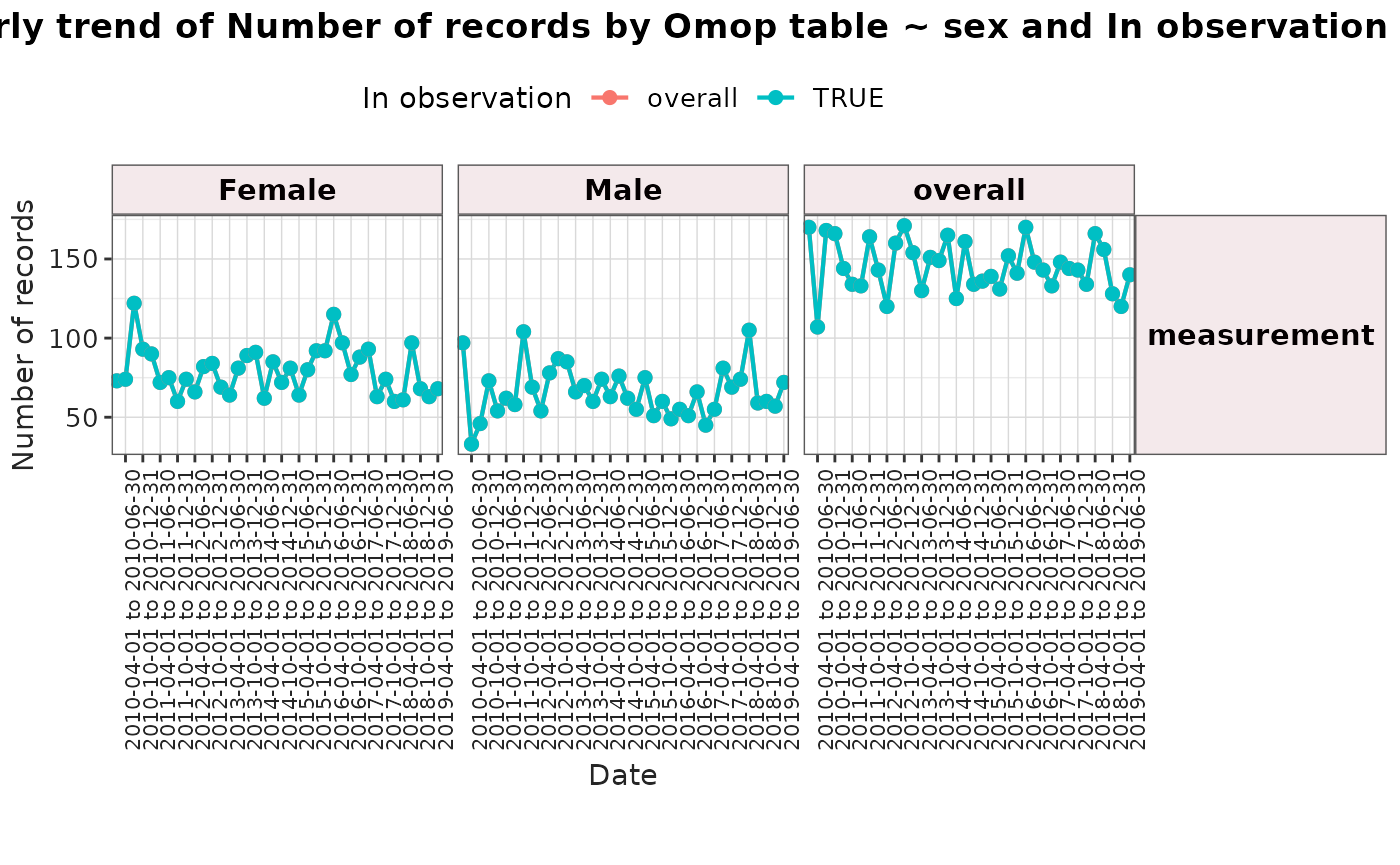
plotTrend() builds a ggplot2 visualisation from a
summariseTrend() result.
result <- summariseTrend(
  cdm = cdm,
  event = "measurement",
  interval = "quarters",
  sex = TRUE,
  ageGroup = list(c(0, 17), c(18, Inf)),
  dateRange = as.Date(c("2010-01-01", "2019-12-31"))
)
#> → The observation period in the cdm ends in 2019-07-03

plotTrend(
  result = result,
  colour = "sex",
  facet = "age_group"
)
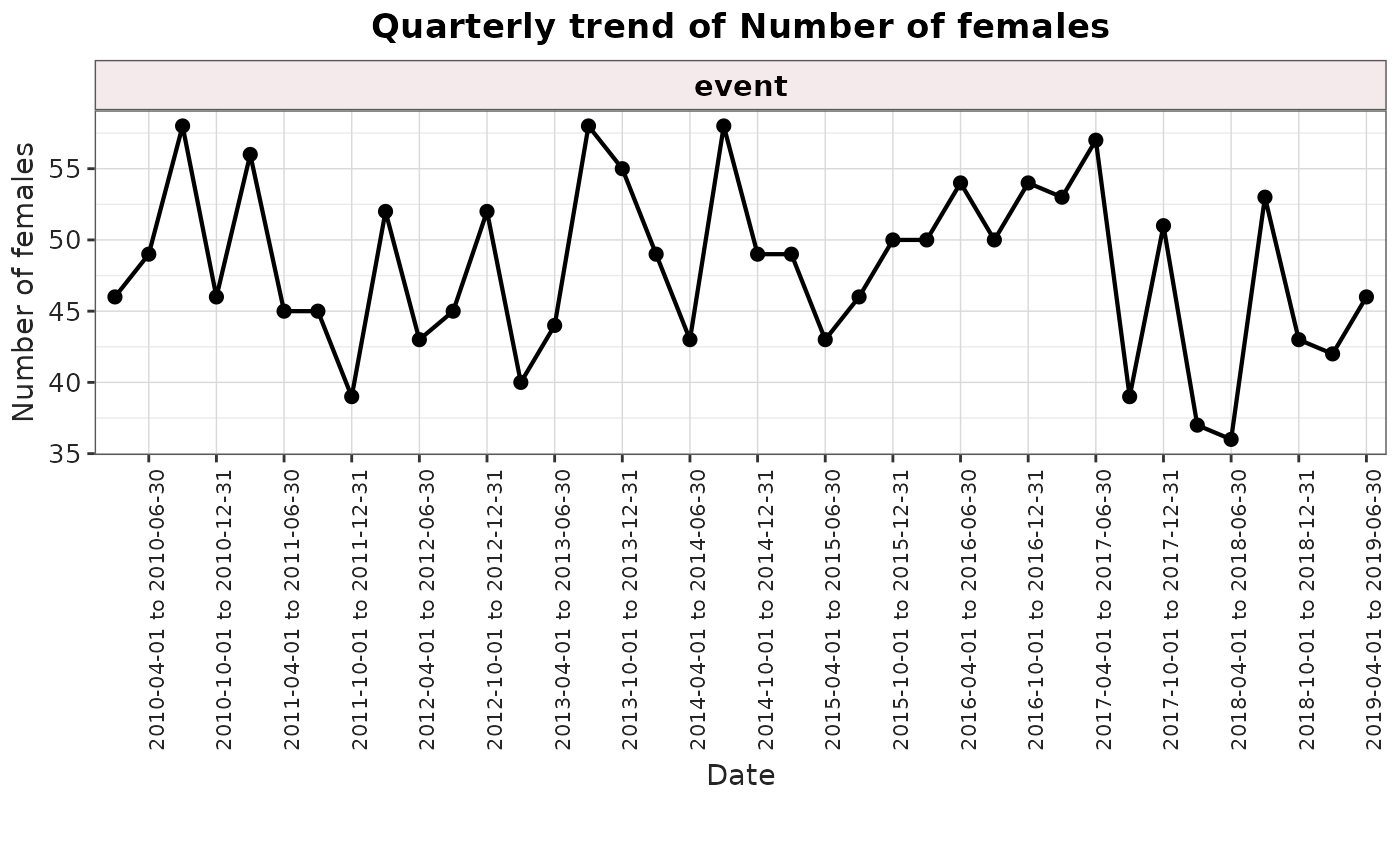
When the result includes several outputs (for example, records,
subjects, or person-days), select the measure to visualise with the
output argument.
result <- summariseTrend(cdm,
  event = "measurement",
  interval = "quarters",
  output = c("sex", "record"),
  dateRange = as.Date(c("2010-01-01", "2019-12-31"))
)
#> → The observation period in the cdm ends in 2019-07-03
plotTrend(
  result = result,
  output = "sex"
)
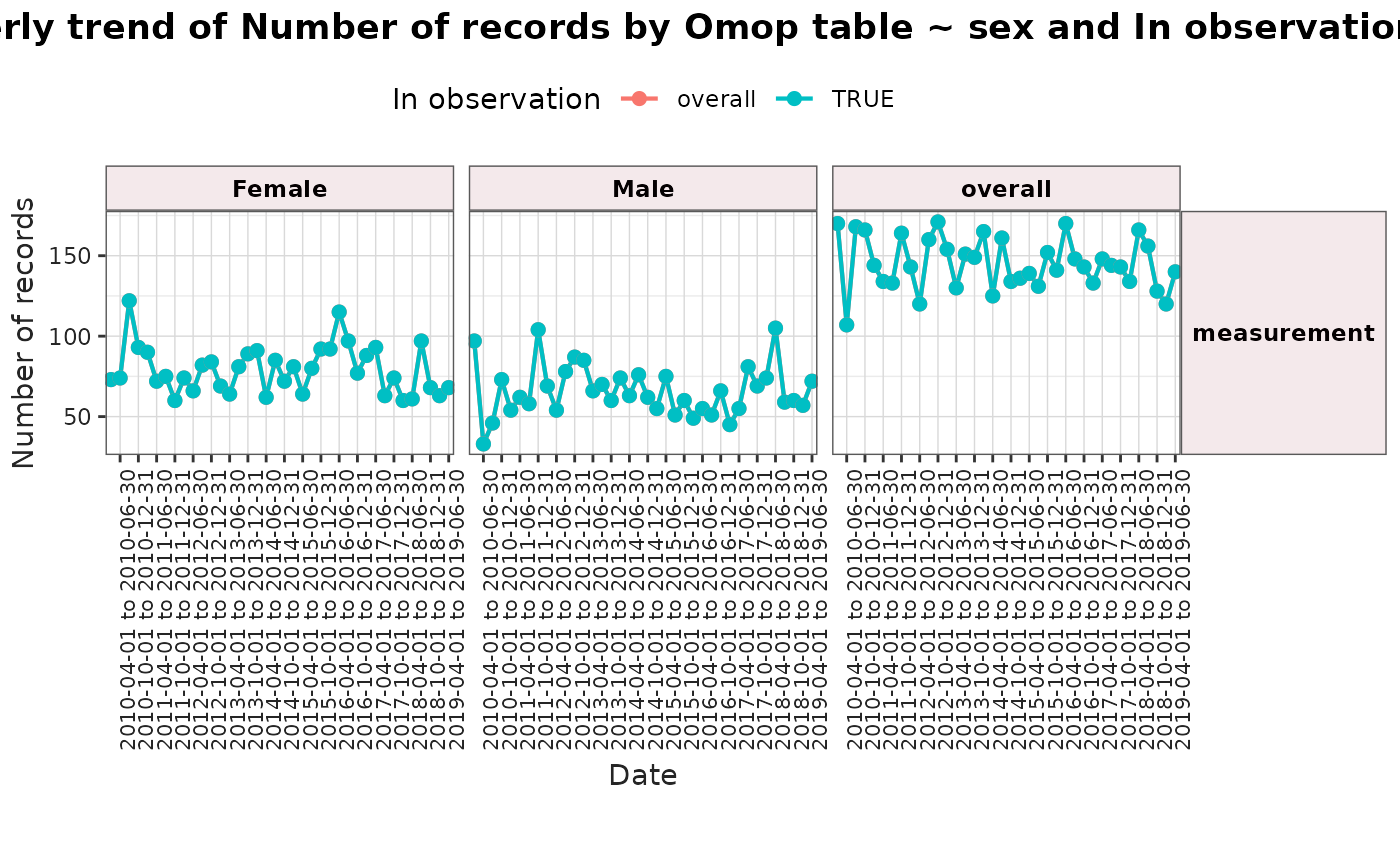
You can also specify faceting with a formula or column name, and colour using one of the tidied result columns.
result <- summariseTrend(cdm,
  event = "measurement",
  interval = "quarters",
  sex = TRUE,
  inObservation = TRUE,
  dateRange = as.Date(c("2010-01-01", "2019-12-31"))
)
#> → The observation period in the cdm ends in 2019-07-03
plotTrend(
  result = result,
  facet = omop_table ~ sex,
  colour = "in_observation"
)